MFA that gets out of your way
Your browser detects the site. Your phone gets a tap. The code fills in.
FactorCat connects your browser, phone, and authenticator tokens into a seamless approve-and-autofill flow.
"I was sick of the old model. Pick up my phone, scroll through poorly-named accounts, find the 5 that all match the same site, memorize a code before the timer runs out, switch to my browser, and key it in. Every. Single. Time."
"Now I click a field and my phone buzzes. One tap and I'm in."
Push to approve
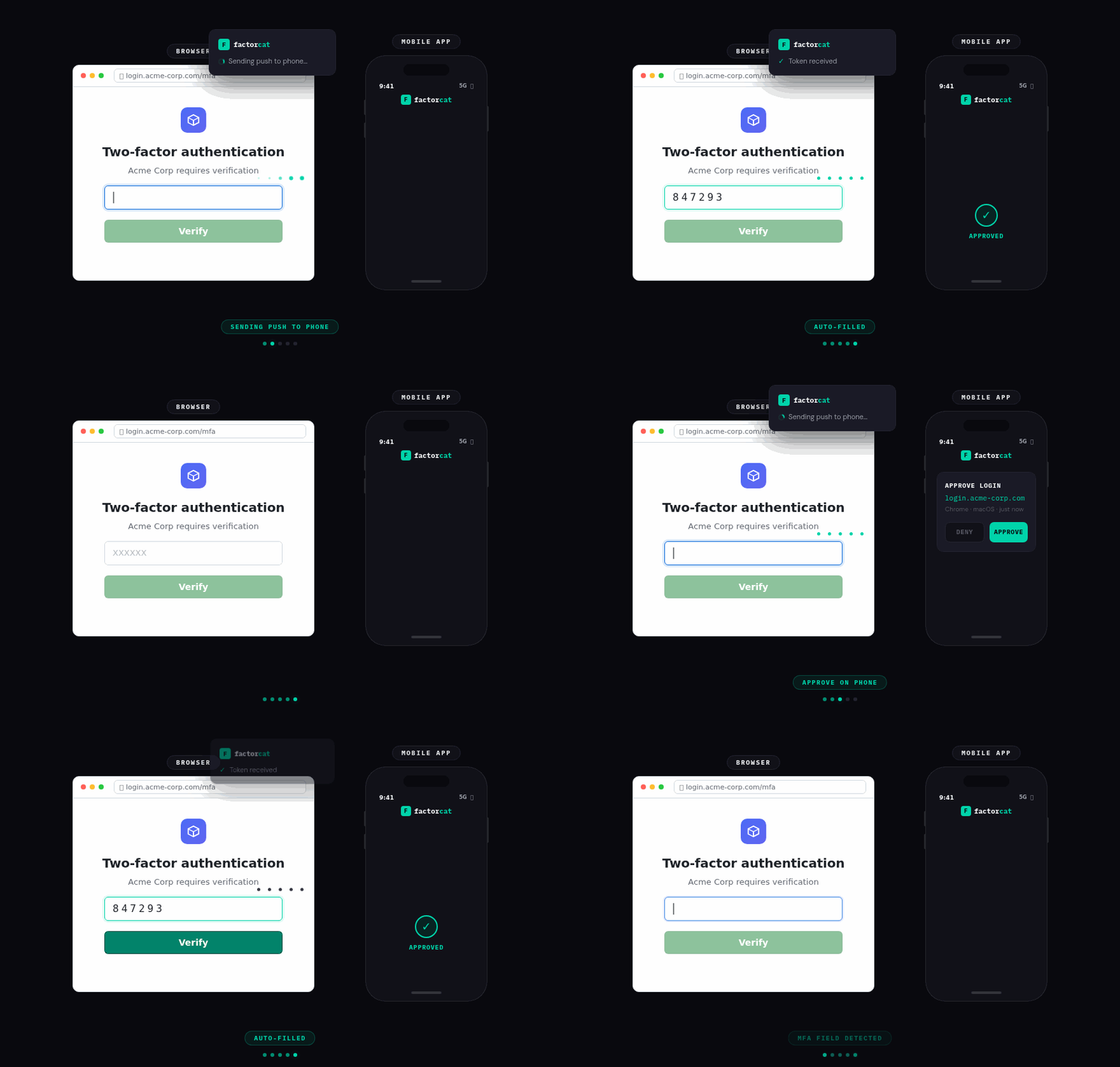
Your browser extension detects the MFA field. Your phone gets a push. Tap approve and the code fills in automatically. No switching apps. No copying digits. No racing the timer.
Security that matches the risk
Your bank gets Locked Vault and one-tap approval. Chipotle gets Cloud Vault and zero-tap auto-fill. Both free — you decide what each account deserves.
Not a password manager
On purpose. Your passwords stay in 1Password or Bitwarden. FactorCat handles only your second factors. No single point of failure.
Share with an expiring link
Going on vacation? Send an expiring token link via text. Set whether each use needs your approval or auto-fills on its own. Revoke anytime.
Set up 2FA in under 5 minutes
Step-by-step guides for your most important accounts.
Authy Migration
Step-by-step guide to switching from Authy to FactorCat. Re-enroll your accounts, import your tokens, and upgrade to push-approve auto-fill MFA.
AWS
Enable MFA on your AWS root account and IAM users with a TOTP authenticator app. AWS requires MFA for root accounts - here's the full setup including IAM policy enforcement.
Coinbase & Crypto
Protect your cryptocurrency with proper 2FA. Set up authenticator app MFA on Coinbase, Kraken, Binance, and Gemini. Never use SMS for crypto - SIM swaps are the #1 theft vector.
Discord
Enable two-factor authentication on Discord in 3 minutes. Required for server moderators and admins. Protect your account from hijacking and Nitro scams.
See how FactorCat compares
Honest comparisons with the authenticators you already know.
FactorCat vs Authy
Authy killed its desktop app. Here's a better path forward.
FactorCat vs Google Authenticator
Same TOTP, but with push approve and browser auto-fill.
FactorCat vs 1Password
Why your second factor should stay separate from your passwords.
Best Authenticator App 2026
How the top MFA apps stack up on security, UX, and price.
Get FactorCat
Available on iOS, Android, Chrome, Firefox, and the web. Free for up to 50 factors.